HideX Calculator Lock
Screenshots


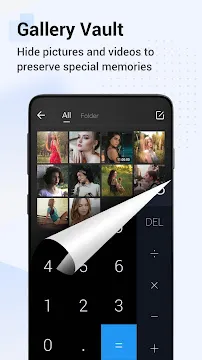
HideX: Calculator Lock Photo Vault App For Android offers a discrete way to protect your private media and personal files. Many people worry about others seeing their private photos when they lend their phone to friends or family members. This application solves that problem by disguising itself as a fully functional calculator on your home screen. To everyone else, it looks like a simple tool for math, but for you, it acts as a secure gateway to a hidden gallery. You enter a secret numeric code into the calculator interface to unlock your private storage space.
The software uses advanced encryption to ensure that your hidden files remain safe from prying eyes and unauthorized access. It allows you to move photos, videos, and documents from your main gallery into a secure, invisible folder. Once you hide these items, they no longer appear in your device’s standard file manager or photo app. This gives you total control over who sees your personal content. The interface remains intuitive and easy to navigate once you pass the initial security layer. It focuses on providing a stable and high-performance environment for managing your most sensitive data.
Complete Disguise and Icon Camouflage
The primary strength of HideX lies in its ability to hide in plain sight. It features a standard calculator icon and opens into a working mathematical tool that performs additions and subtractions perfectly. This deception ensures that curious people will never suspect the app contains hidden data. You can even change the icon of the application to other common tools like a weather app or a compass. This level of camouflage makes it nearly impossible for anyone else to find your vault.
Beyond the icon, the app offers a “fake vault” feature to handle stressful situations. If someone forces you to open the app, you can enter a secondary password that opens a different, harmless storage area. This decoy folder can contain non-sensitive photos to satisfy an intruder’s curiosity. It provides an extra layer of psychological defense for your true secrets. This creative approach to security keeps your real data untouched and unknown.
Secure Media Management and Gallery Features
Once you enter the hidden area, the app provides a smooth experience for viewing and organizing your files. You can create multiple folders to categorize your photos and videos by date, event, or importance. The built-in video player supports various formats and allows you to watch your private clips without leaving the secure environment. This prevents your hidden media from appearing in the “recent files” list of other apps.
- Organize hidden photos into custom albums.
- Play private videos directly within the secure vault.
- View high-resolution images with a smooth zooming feature.
- Share files back to the public gallery whenever you choose.
Managing your files is fast and efficient due to the optimized file transfer system. You can select hundreds of images at once and move them into the vault in a matter of seconds. The application handles large file sizes without slowing down your phone. This makes it a reliable choice for users who have massive collections of private media.
Private Browser and Incognito Downloading
HideX Calculator Lock includes a built-in private browser that allows you to explore the web without leaving a digital footprint. Any website you visit through this browser remains separate from your standard browser history and cookies. This is perfect for searching for sensitive information or downloading media directly into your vault. The app ensures that your browsing habits remain entirely personal and protected.
The browser also features an automatic video downloader that identifies media on web pages. You can download videos directly into your secret folders without using external tools. This keeps your downloads invisible to the rest of the system from the very beginning. You can bookmark your favorite private sites and access them with a single tap within the vault. It creates a complete ecosystem for private entertainment and research.
Intruder Alerts and Break-in Prevention
Safety features go beyond just hiding files; the app actively monitors for unauthorized access attempts. If someone enters the wrong password, the software uses your front camera to take a secret “intruder selfie.” It records the time of the attempt and the photo of the person trying to break in. You can check these alerts later to see exactly who tried to peek at your files.
The app also offers a “disguise lock” that shows a fake crash screen when someone tries to open the vault. This convinces the intruder that the app is simply broken or incompatible with your phone. These proactive measures discourage people from trying to bypass your security. You get a detailed log of every interaction with your vault to maintain full awareness of your privacy status. It turns your smartphone into a high-tech security station.
Cloud Backup and Data Recovery Options
Losing your phone should not mean losing your precious memories or important documents. HideX provides an encrypted cloud backup service to protect your hidden data against hardware failure or loss. You can sync your vault with your personal cloud account to ensure you can recover your files at any time. The data remains encrypted during the transfer and while stored in the cloud.
If you accidentally delete a file, the app includes a recycle bin feature that allows for quick recovery. You can restore items to your vault within a specific timeframe before they are permanently removed. This safety net prevents heartaches caused by accidental taps or mistakes. The recovery process is simple and requires your master password to maintain security. You can move between different Android devices while keeping your secret gallery intact.
Advanced Privacy and System Integration
HideX Calculator Lock integrates deeply with the Android system to prevent data leaks. It can automatically hide itself from the “recent apps” list so no one sees a preview of your vault. You can also enable a feature that clears the clipboard every time you close the app. This prevents sensitive passwords or links from being pasted elsewhere by accident. It covers every possible angle where your privacy might be at risk.
You can also use the app to hide and lock other installed applications. This “App Lock” feature requires a password or fingerprint to open your social media or banking tools. It adds a final layer of defense for your entire digital life. The software manages these tasks with minimal impact on your battery life and RAM. You get a fast and responsive device that keeps your secrets better than any standard folder.
Final Thoughts
HideX: Calculator Lock Photo Vault App For Android represents the ultimate tool for personal privacy management. It successfully combines clever camouflage with high-grade encryption to protect your digital life. By offering a private browser, intruder alerts, and cloud backup, it addresses all the common fears of mobile users. The simple calculator interface hides a powerful suite of security features that are easy for anyone to use. You can finally lend your phone to others without feeling anxious about your private photos or videos. This application ensures that your personal business stays personal, no matter who holds your device. It provides the peace of mind and control that every smartphone owner deserves in the modern age.